Dashboard & set-up
What needs your attention today: key figures, alerts and open tasks on one page, plus a guided company set-up.
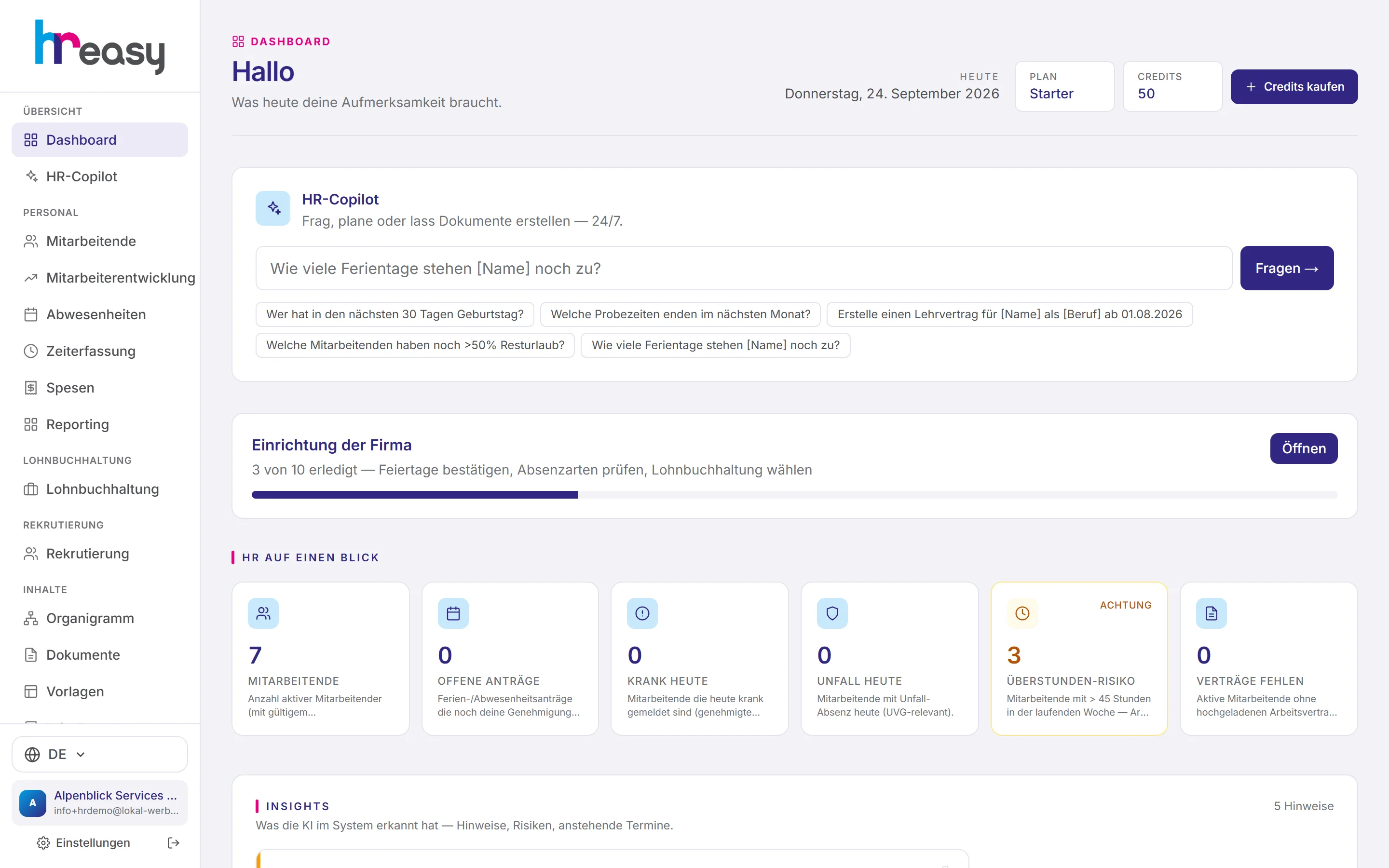
Every morning, every company faces the same question: what is on today? Who is absent, which request is waiting, which probation period ends soon? Without a system, the answers are scattered across calendars, inboxes and people’s heads.
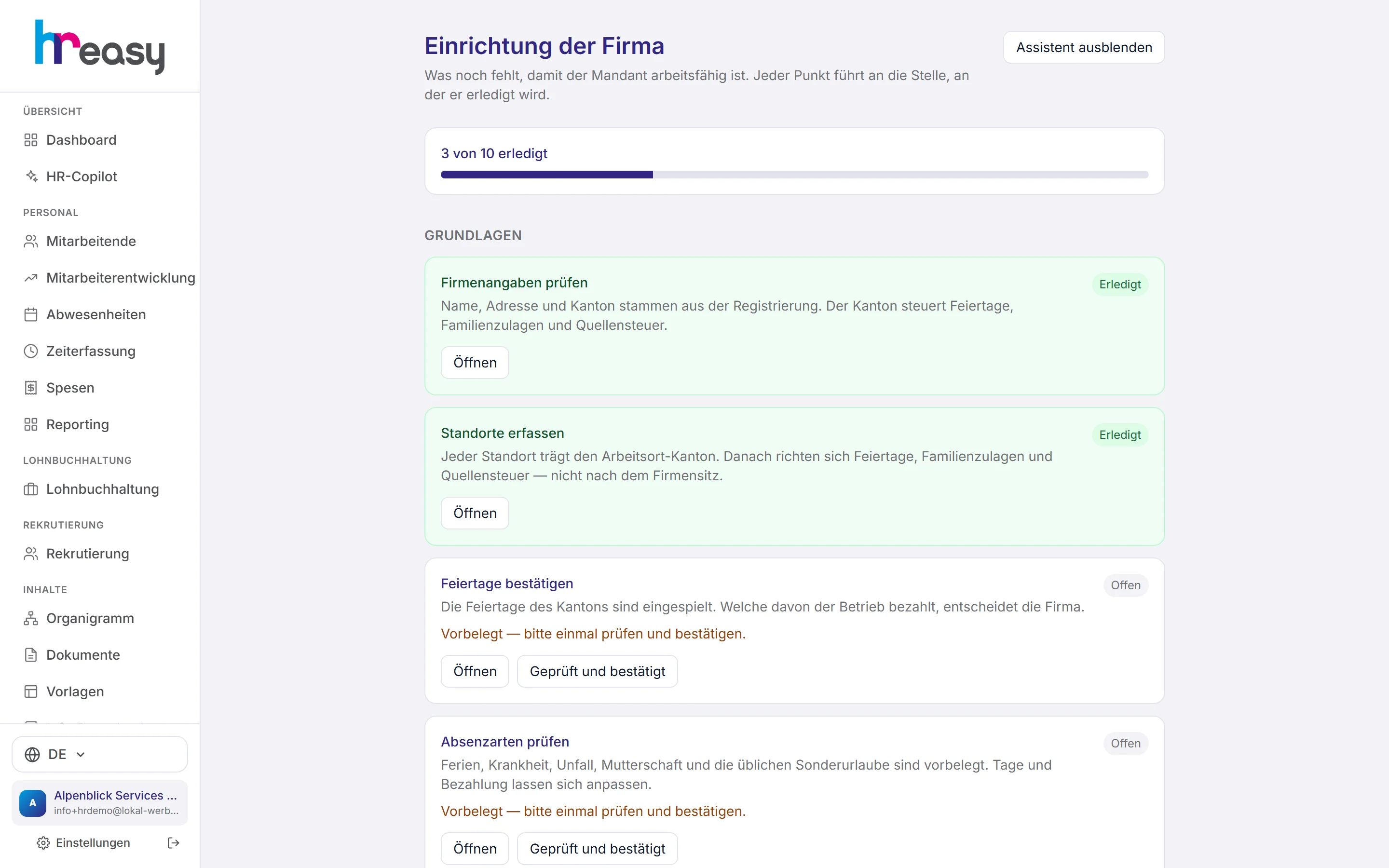
The HREasy dashboard answers them on one page. At the top the HR Copilot for quick questions, below that six key figures, each linked to the right list, then the alerts the system derives from your data according to fixed rules, and finally the open tasks. When you are just starting, you also see how far the company set-up has progressed and what comes next.
Sound familiar?
- A medical certificate has been missing for weeks, and it only comes to light at payroll time.
- A probation period ends without anyone having held the review meeting.
- Requests from employees sit unnoticed in the inbox.
- When starting with new software, it is unclear what needs to be set up first.
Six figures that matter, each one click from its list
The tiles show how many people are employed today, how many requests are awaiting your approval, who is sick or injured today, who is over 45 hours in the current week and who does not yet have an employment contract on file.
Each tile leads directly to the matching list. Above them sits the HR Copilot with example questions such as «Which probation periods end next month?».
- Overtime risk: over 45 hours in the current week
- Missing contracts: active employees without an employment contract in the archive
- All figures only for your own area if your role is restricted
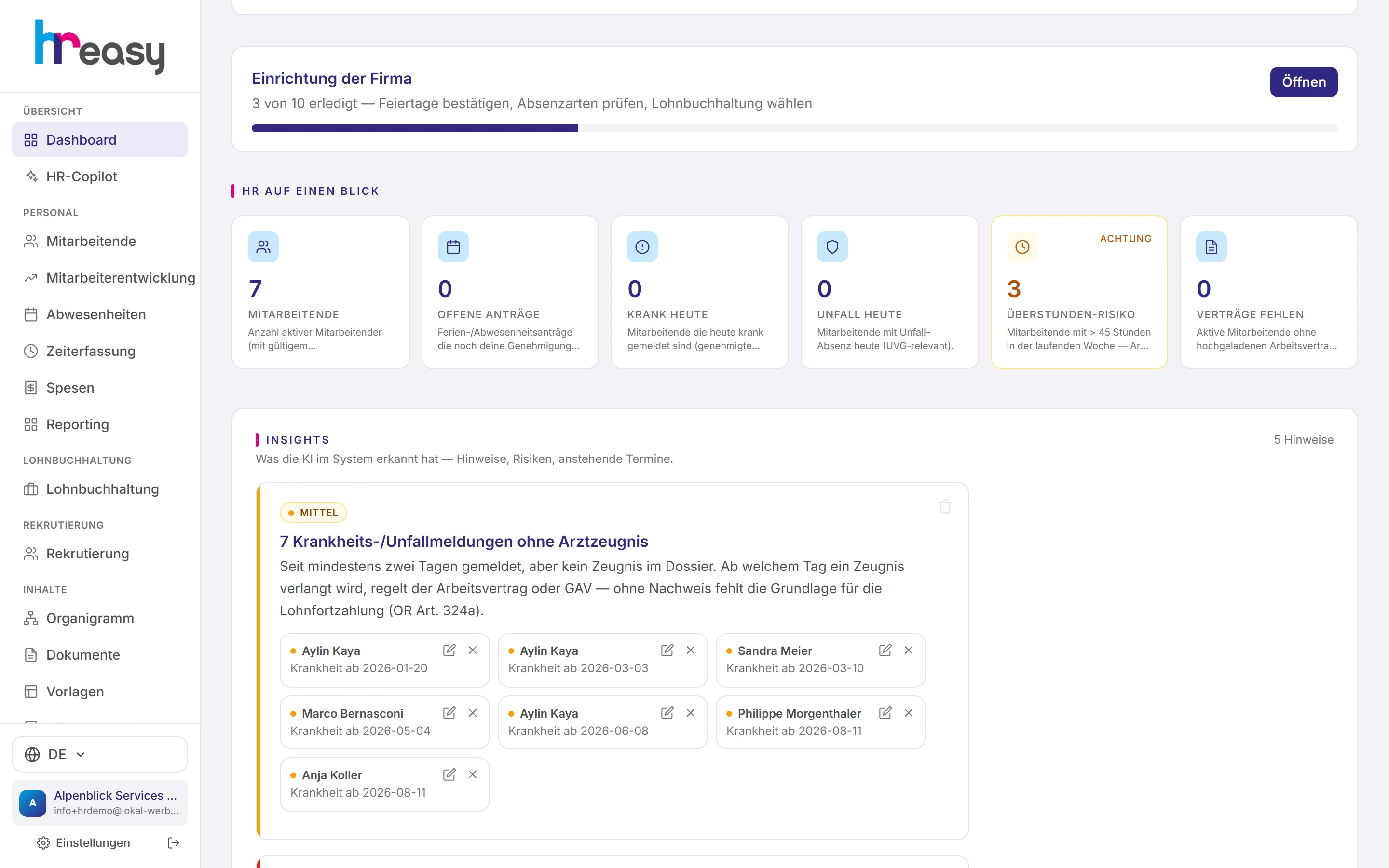
The system flags what you would otherwise overlook
The alerts are derived from your data according to fixed, traceable rules: sick notes without a medical certificate, excess hours above the Labour Act limit, little holiday taken, probation periods ending within 14 days, upcoming retirements, birthdays and work anniversaries.
Each alert has a level (high, medium, info) and names the people concerned. A click takes you to their time tracking or absences; resolved alerts or individual people can be hidden.
- Night, shift and Sunday work with supplements
- New starters in the next 7 days
- Incomplete master data and missing HR documents
- Hidden alerts stay hidden
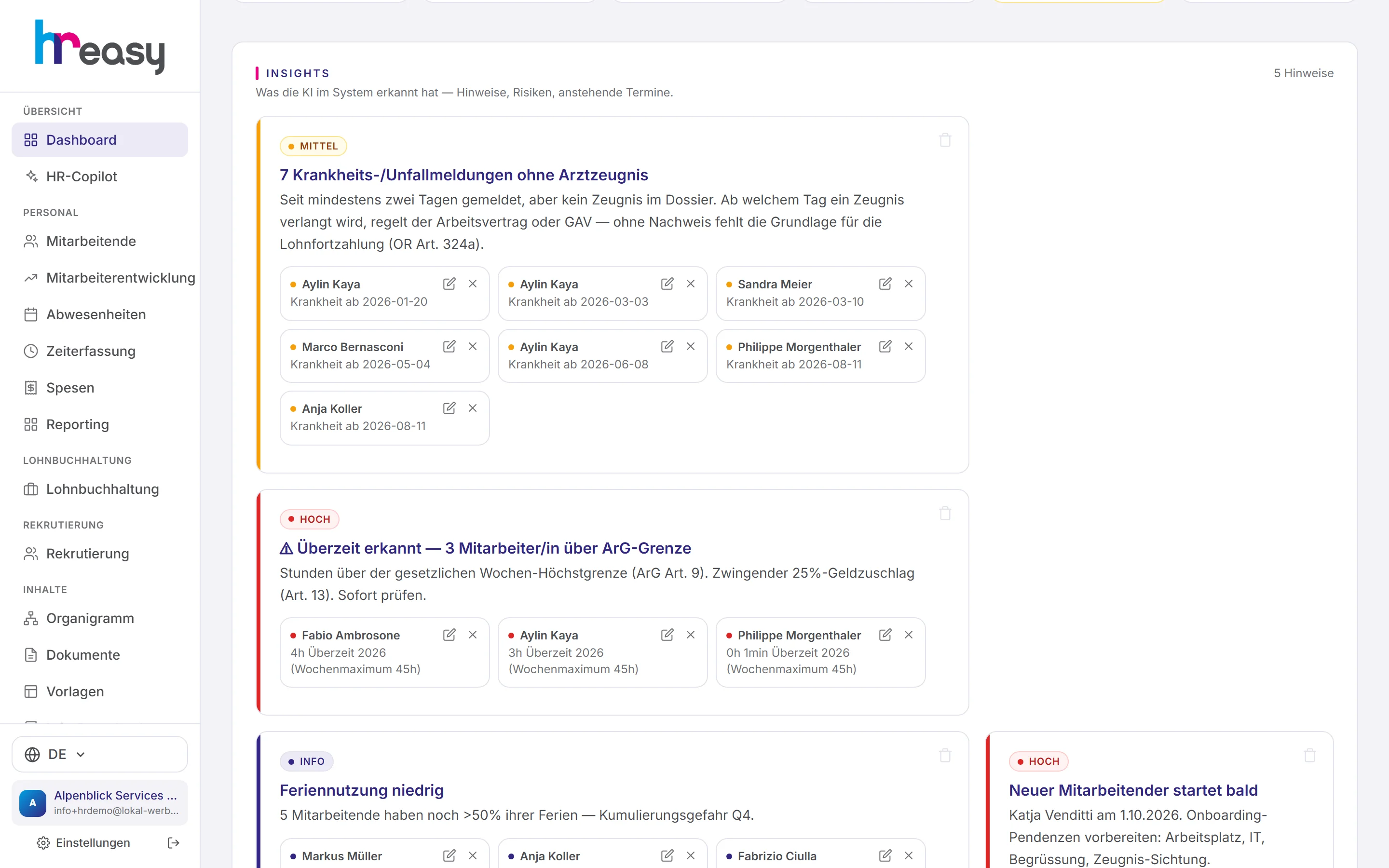
A guided start, no HR manual needed
The set-up guides you in two parts through everything HREasy needs for correct calculations. First the HR basics: company details, locations, public holidays, absence types and employees. Then, if you use payroll, contribution rates, BVG thresholds, daily sickness allowance and payroll master data.
Steps with defaults only count as done once you confirm them. An existing default is not enough, because it might be wrong for your company.
- The canton of the location determines public holidays, family allowances and withholding tax
- Cantonal public holidays are loaded, and you confirm which ones are paid
- Without daily sickness allowance insurance the Bernese scale applies, and this is asked explicitly
A morning with HREasy
From the first glance to a completed task, without switching between programs.
Open
The dashboard shows the date, your plan and the six key figures of the day.
Read alerts
The most important alerts are at the top, with level and the people concerned.
Work through tasks
Open tasks from events & cases; accept requests from employees directly.
Ask
Anything that is not on a tile, you ask the HR Copilot.
Done
Hide alerts, close tasks, and the day is in order.
Everything works together
No module stands alone. What you enter here flows automatically to wherever it is needed, without entering it twice.
What HREasy offers
Six key figure tiles
Employees, open requests, sick today, accident today, overtime risk and missing contracts, each linked to its list.
Rule-based alerts
Fourteen alert types with a high, medium or info level, derived from your data according to fixed rules.
Hiding that is remembered
Entire alerts or individual people within them can be hidden, and the system remembers it.
Tasks
Open tasks from events & cases: contracts, promotions, salary changes. Requests from employees are marked and can be accepted directly.
HR Copilot card
Input field with example questions on birthdays, probation periods, remaining holiday and holiday days.
Guided set-up
Ten steps with payroll, six without, with a progress bar on the dashboard.
Confirmation instead of assumption
Defaults such as contribution rates only count as set up after your confirmation.
Only your area
Key figures, alerts and tasks respect the role’s location and organisational restrictions.
Plan and credit
Your current plan and AI credit are shown at the top, with a direct way to top up.
What you should know
Alerts based on rules, not on gut feeling
The alerts on the dashboard follow fixed rules: a sick note without a medical certificate is a sick note without a medical certificate, and a probation period ends on a specific date. That is why the alerts are traceable and the same every time.
For questions that cannot be expressed as a rule, the HR Copilot is right above.
Why the set-up asks for confirmations
Contribution rates, BVG thresholds or the rules for daily sickness allowance differ from company to company. A default that nobody has checked leads to wrong deductions later.
That is why such a step only counts once someone clicks «Bestätigen» (confirm). If you do not use payroll, you answer that question with no and are fully set up after six steps.
Frequently asked questions
What do I see first after logging in?
The dashboard: date, plan, the HR Copilot, six key figures, the alerts and your open tasks.
Where do the alerts come from?
From fixed rules that HREasy applies to your data, for example «sick note without medical certificate» or «probation period ends in 14 days».
Can I hide alerts?
Yes, entire alerts or individual people within them. The system remembers your selection.
How long does the set-up take?
That depends on your data. The set-up comprises six steps for the HR basics and four more if you use payroll.
Do team leaders see the same figures as management?
Only if their role is not restricted. With a location or organisational restriction, the dashboard only shows their own area.
More modules
Ready to automate dashboard?
Set up in 5 minutes, no HR knowledge needed. The agent takes care of the rest.
Request trial access now