Time tracking & overtime
Working time accurate to the minute, overtime and excess hours kept strictly apart, projects and work schedules included, checked against the Labour Act.
Since 2016 the Labour Act has required complete records of start, end and breaks for most employees (Ordinance 1 to the Labour Act, Art. 73). In many SMEs this still ends up on timesheets or in Excel, and at the end of the month someone adds up overtime by hand.
HREasy runs time tracking as one continuous system: employees clock in with a timer or add times afterwards, and the administration sees the week, month and year of every person and of the whole company. Breaks are deducted by law, overtime and excess hours are kept separate, and breaches of the Labour Act are flagged before they get expensive. And because every view uses the same calculation, the portal, the administration and reporting always show the same figure for the same day.
Sound familiar?
- Timesheets come back late, incomplete or illegible.
- At the end of the month you add up overtime by hand, and the total never quite matches.
- Nobody knows for sure whether maximum hours, breaks and rest periods were respected.
- Project hours and budgets live in another spreadsheet that is never up to date.
Every day at a glance, with target, actual and breaks
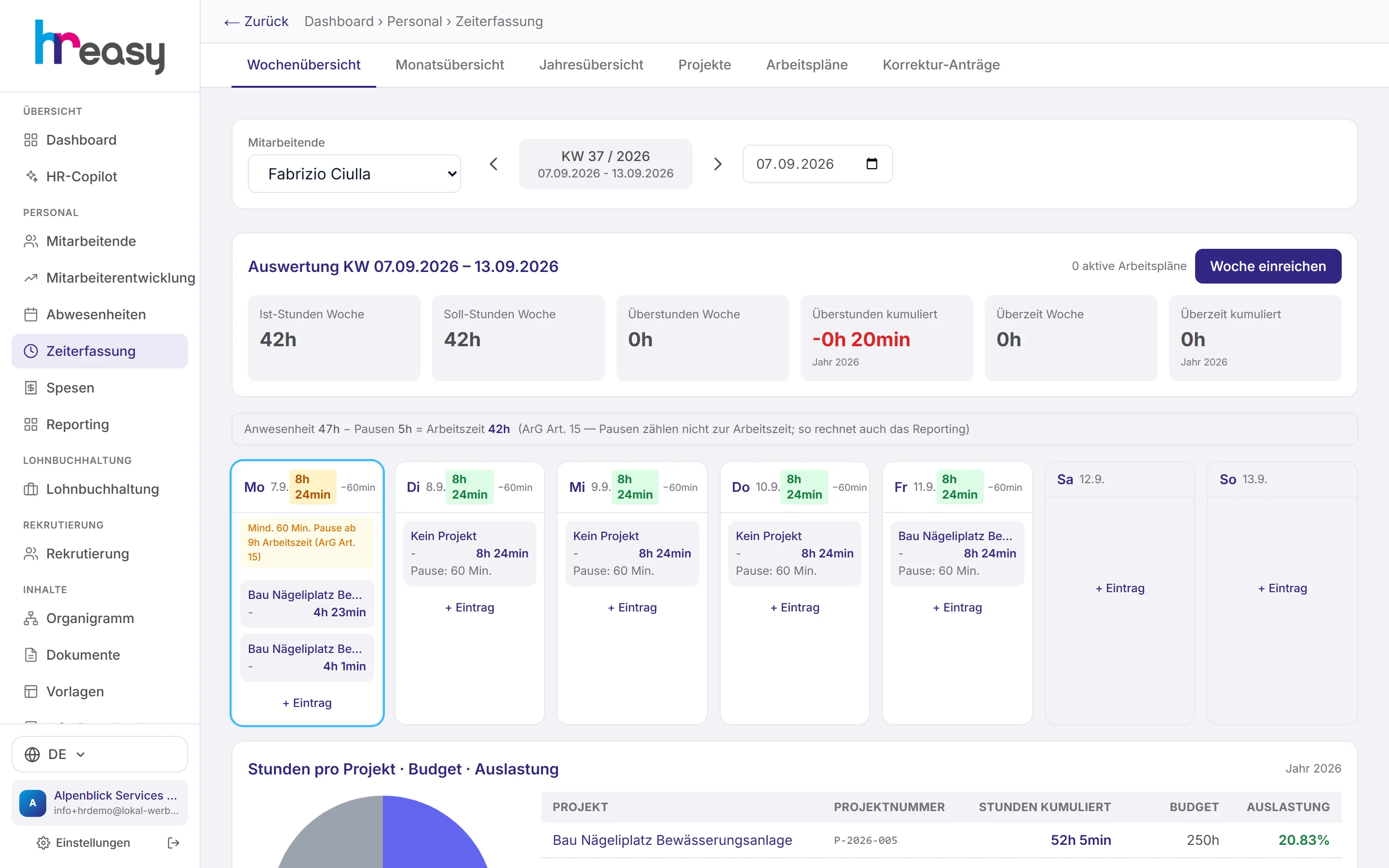
A person's week appears as a daily grid: every entry with project, task and break, plus the daily target and the plus or minus hours. Public holidays and approved absences sit right in the grid, so nobody enters hours on a day off.
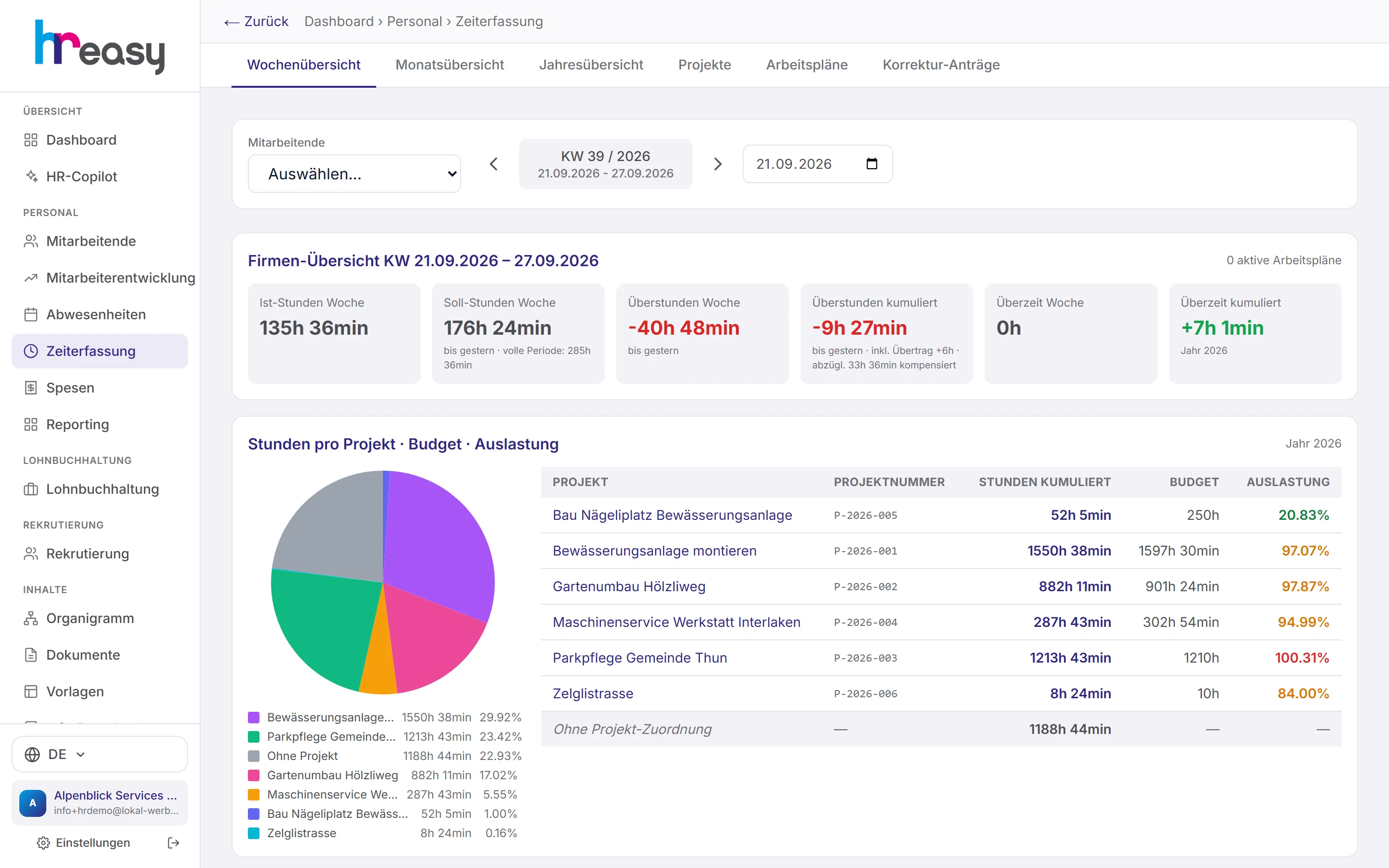
Employees submit the week, and you approve it or reject it with a reason. Without a person selected, the same view shows the whole company with the week's actual hours, target hours, overtime and excess hours.
- Mandatory breaks under Labour Act Art. 15 deducted automatically: 15, 30 or 60 minutes depending on the length of the day
- Notices for a daily span of more than 12.5 and 14 hours (Labour Act Art. 10)
- Sunday and night work flagged with the statutory supplement
- Status per week: draft, submitted, approved or rejected
From the day to the annual balance, without a single formula
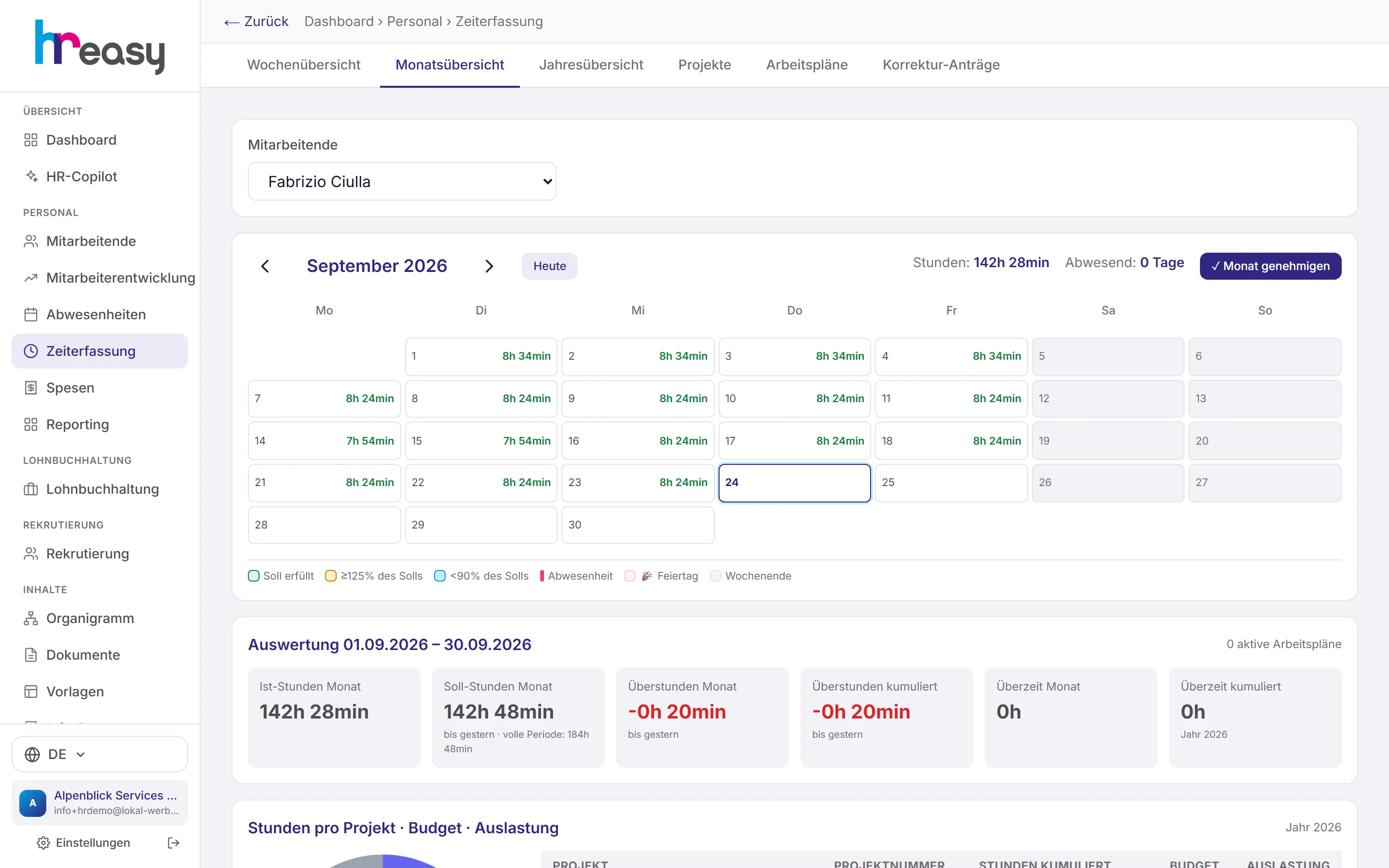
The monthly calendar shows the hours of every day; one click takes you to the week. With «Monat genehmigen» (approve month) you lock the person's time entries and expenses so that nothing shifts after the hand-over to payroll.
The annual overview shows target, actual, overtime, compensation and the cumulative balance month by month, including the carry-over from the previous year. The rule is simple and visible: carry-over plus overtime minus compensation gives the balance.
- Daily target from workload and working days: 80 % over four days gives 8 h 24 min, not 6 h 43 min
- Paid absences credit the daily target automatically
- Flexitime counts minus hours as well
Book hours where they are worked
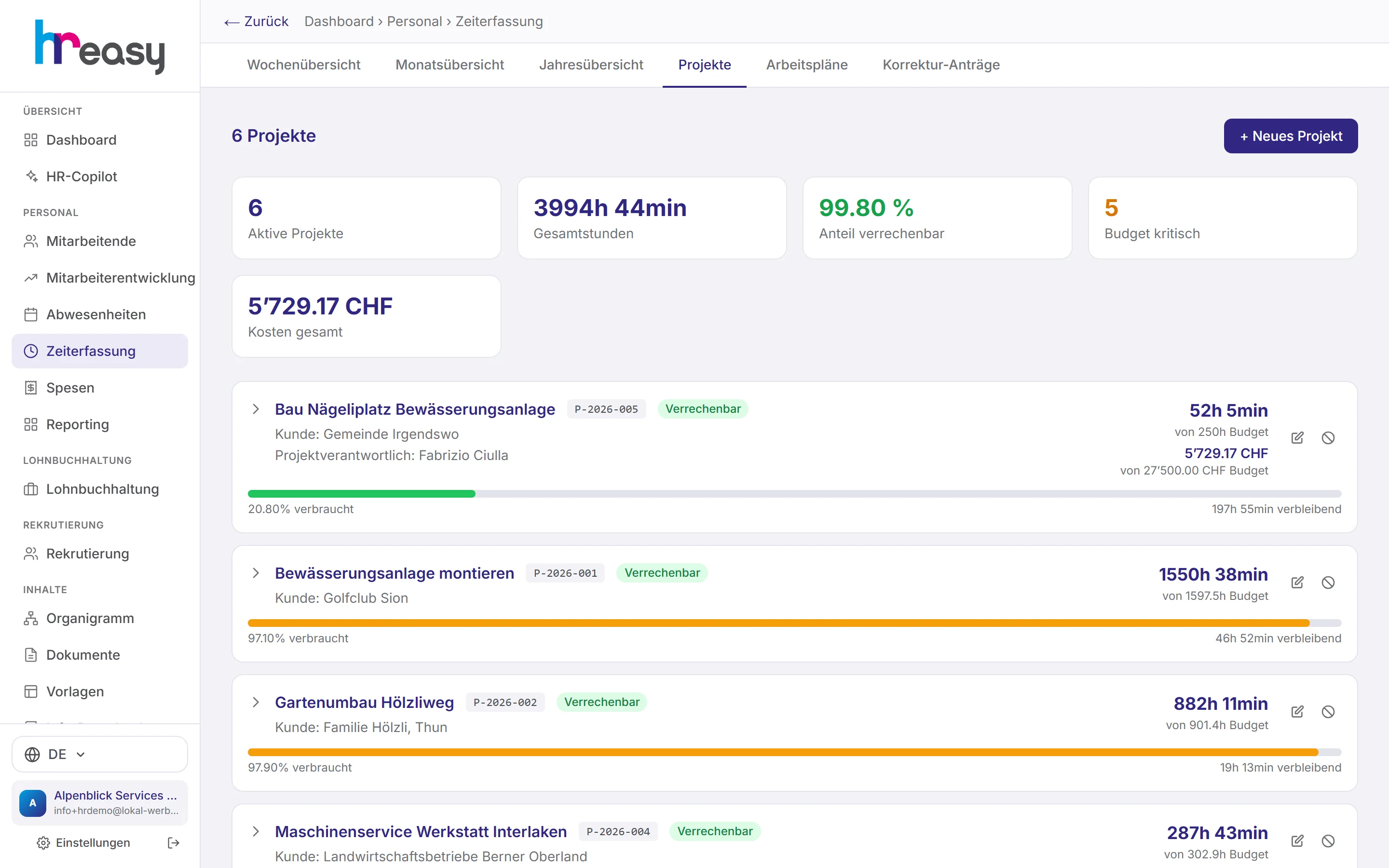
Projects get a number, people responsible, an hours budget and, if you wish, an hourly rate. Employees choose the project before starting the timer, and you see at any time how much of the budget has been used and which projects are becoming critical.
For each project you can define tasks and members with target hours; a chart compares target and actual per person.
- Total costs and share of billable hours
- Warning as soon as a budget is exceeded
- Hours per project as a pie chart in the company overview
Plan, check, release, before the work starts
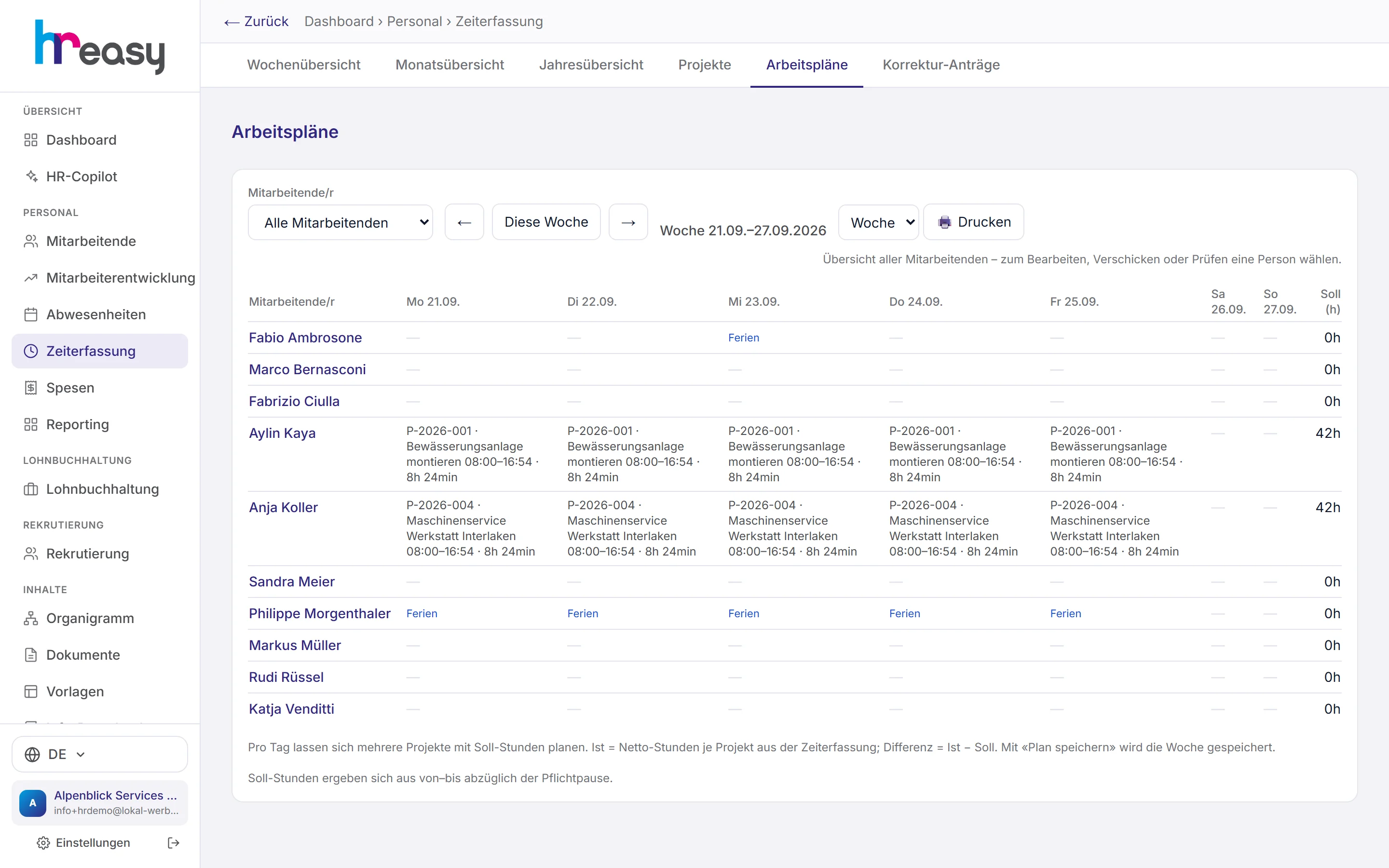
In the work schedule you define for each day who works on which project and when. The actual hours come from time tracking, with the difference alongside. Employees see released schedules in the portal and in the app.
«Plan prüfen» (check schedule) checks the planned period against the Labour Act, the CO and the CEA, meaning rest periods and maximum hours, before anyone starts the shift.
- Print weekly and monthly schedules
- A critical breach can only be released with a reason (Labour Act Art. 15a)
- Overview of all employees on one page
From clocking in to the payslip
A time entry is recorded once and travels through every stage from there, without anyone retyping it.
Clock in
Start the timer in the portal or the app, choose a project, tap for break and end. Manual entries remain possible.
Calculate
Deduct breaks under the Labour Act, total the day's minutes, update target and balance, detect excess hours.
Check
Submit the week, approve it or reject it with a reason; corrections run as requests with a trail.
Close
«Monat genehmigen» locks the month's times and expenses for the hand-over to payroll.
Pass on
Hours flow into reporting and, for hourly-paid staff, into payroll.
Everything works together
No module stands alone. What you enter here flows automatically to wherever it is needed, without entering it twice.
What HREasy offers
Timer with project selection
Start, break and end with one tap, in the browser and in the app. The timer is kept when the window is closed.
Working time, not presence
What counts is working time after deducting breaks. Presence remains visible because the Labour Act's 14-hour span depends on it.
Overtime and excess hours apart
Overtime under the contract (CO Art. 321c) and excess hours above the statutory maximum (Labour Act Art. 9) are tracked separately.
One day, one figure
Week, month, year and reporting are sums of the same daily minutes. There is no second rounding that could differ.
Correction requests
Employees request corrections across several items and projects; approving books them immediately, rejecting requires a reason.
Monthly lock
An approved month can no longer be changed, neither the times nor the expenses.
AI compliance check
At the push of a button the AI checks the current year's hours against the CO, Labour Act and CEA and summarises anything unusual.
Absences taken into account
No entries are possible on full days of absence, nor after the person has left.
Locations and place of work
Employees choose the place of work before starting. The canton determines the public holidays.
What you should know
Why the minute is the unit
In many systems each view rounds on its own: the day to quarter hours, the month to tenths, reporting once more. In the end two minutes are missing somewhere, and nobody knows why.
HREasy calculates in whole minutes and rounds exactly once, per day. Everything above that is a sum. If you add up the displayed days by hand, you arrive exactly at the stated weekly, monthly and annual figures.
The daily target is divided by your working days
Anyone working 80 % over four days has a working day of 8 h 24 min, not 6 h 43 min. HREasy takes the weekly hours from contract and workload and divides them by the person's actual working days.
That way no minus hours build up on days off, and on working days the balance is right from the first clock-in.
Breaks do not count as working time
The Labour Act requires a break of 15 minutes from 5.5 hours, 30 minutes from 7 hours and 60 minutes from 9 hours. HREasy deducts the larger value per day: the mandatory break or the break actually recorded.
A day with eight hours of presence and a 30-minute break gives 7 h 30 min of working time, the same in the entry, in the portal and in reporting.
Warning you before it gets expensive
Excess hours above the weekly maximum require a 25 % supplement, Sunday work 50 %, temporary night work a 25 % pay supplement. HREasy flags such cases in the very week they arise, and the dashboard shows the overtime risk of the current week.
The reverse matters just as much: because breaks are deducted correctly, HREasy reports no excess hours where there are none and does not demand supplements that are not owed.
Frequently asked questions
Is time tracking mandatory in Switzerland?
For most employees, yes: start, end and breaks must be recorded (Ordinance 1 to the Labour Act, Art. 73). For certain employees simplified recording or a waiver is possible (Art. 73a and 73b).
Do I need a time clock terminal?
No. Times are recorded in the browser on a computer or in the HREasy app on a smartphone.
How are overtime and excess hours distinguished?
Overtime is time beyond the contractual working hours (CO Art. 321c); excess hours are beyond the statutory maximum of 45 or 50 hours (Labour Act Art. 9). HREasy tracks both separately and shows the supplements.
Can employees correct wrong entries?
Yes, via a correction request. The administration approves it or rejects it with a reason; every change remains traceable.
Does this also work for part-time and irregular working days?
Yes. The daily target is based on the person's workload and actual working days, not on a fixed five-day week.
How do the hours get into payroll?
Approved months are available to payroll; for hourly-paid staff the hours are taken over automatically.
More modules
Ready to automate time tracking?
Set up in 5 minutes, no HR knowledge needed. The agent takes care of the rest.
Request trial access now