Organisation chart & locations
The organisation chart draws itself from your hierarchy: company, business units, divisions and teams with management, staff positions and contacts, searchable and printable.
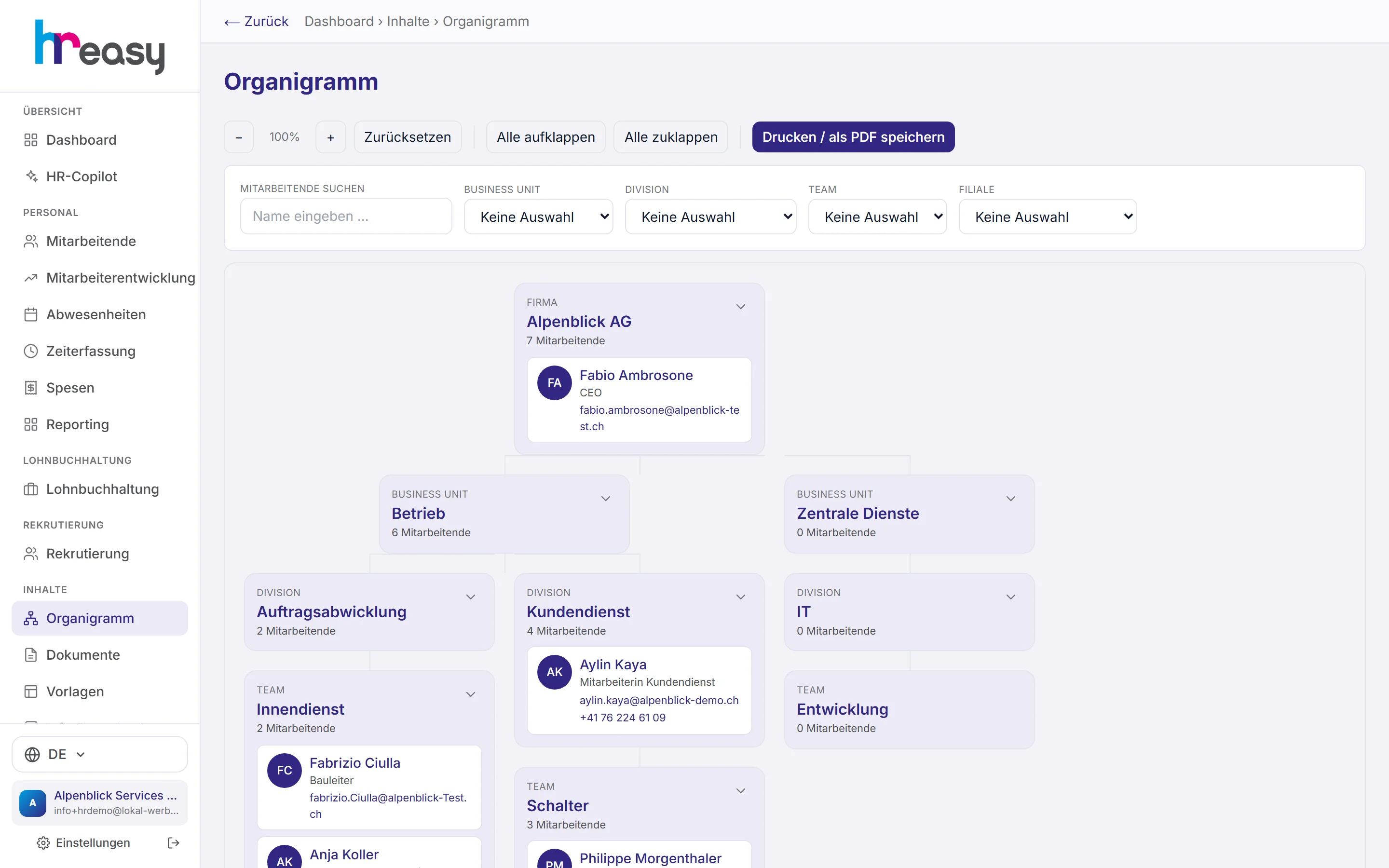
An organisation chart in PowerPoint is out of date the day after the next person joins. And the question of who reports to whom and where someone works matters for more than the picture: public holidays, family allowances and withholding tax depend on the canton of the place of work.
In HREasy you maintain locations, organisational units and the hierarchy once in the settings. The organisation chart draws itself from them, with person cards, management and staff positions. The same structure filters reporting, restricts the rights of HR roles and determines which cantonal rules apply to whom.
Sound familiar?
- The organisation chart on the website still shows last year's people.
- Nobody knows for sure who is responsible for a staff matter at the branch.
- Public holidays and allowances are calculated the same for everyone, even though the branch is in another canton.
- Reports by department or location are manual work.
Drawn from the data, not by hand
Each unit is a box with its headcount, each person a card with photo or initials, job title, phone and e-mail. Solid lines are reporting lines, dashed lines are staff positions without authority to give instructions.
You expand and collapse units individually or all at once, zoom, search by name and filter by organisational unit or branch. Matches are highlighted without the chart jumping.
- Roles: executive management, head of business unit, head of division, team lead, staff position, employee
- People without an assignment appear separately with a note
- E-mail link as mailto, Gmail or Outlook, depending on the setting
- Dedicated print layout for PDF
Maintain locations, organisation and hierarchy once
You record locations with their type (head office or branch), address, contact person and canton. The canton is mandatory because family allowances, withholding tax, public holidays and minimum wages depend on the place of work.
The organisational structure covers departments, teams and cost centres. In the hierarchy you build the tree with freely definable levels and store central contact addresses, for example who handles staff questions and who handles expenses.
- Headcount per unit
- Management and line manager in the personnel record
- Note: moving a unit widens the access of restricted roles
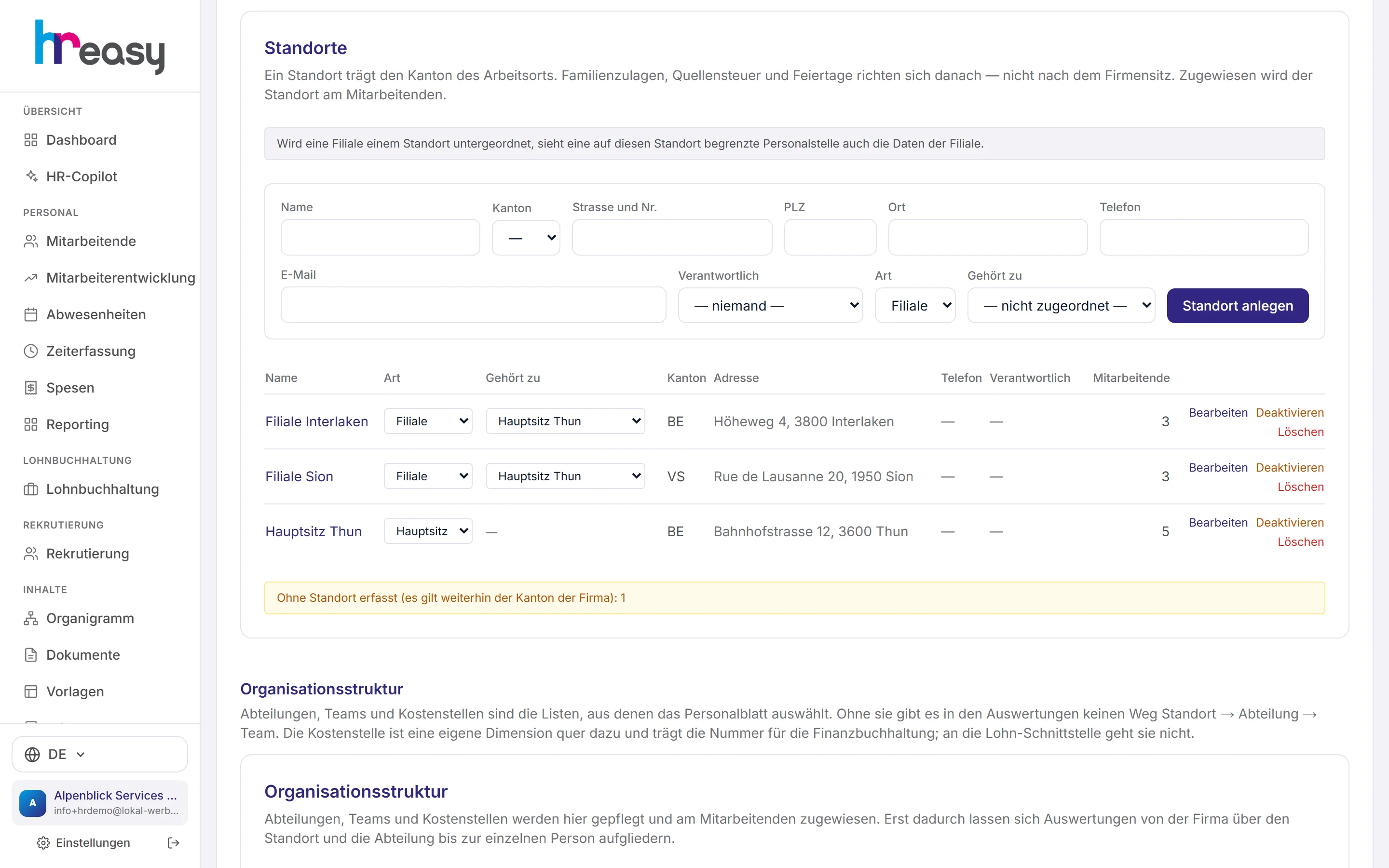
From structure to chart
One structure, many uses: what you maintain here is used by the organisation chart, reporting, permissions and payroll.
Locations
Record head office and branches with canton, address and contact person.
Units
Create business units, divisions, teams and cost centres.
Assign
Set unit, role, management and line manager in the personnel record.
Organisation chart
The chart draws itself, searchable, filterable and printable.
Everything works together
No module stands alone. What you enter here flows automatically to wherever it is needed, without entering it twice.
What HREasy offers
Drawn automatically
The organisation chart is generated from the maintained hierarchy and is always up to date.
Levels of any depth
Company, business unit, division, team, and further levels as needed.
Reporting line and staff position
Solid and dashed lines with a legend.
Person cards
Photo or initials, job title, phone and e-mail at every level.
Search and filters
Search by name, filter by organisational unit or branch, with a «filtered: n of N» display.
Print and PDF
Dedicated print layout, «Drucken / als PDF speichern» with one click.
Locations with canton
Head office and branches; the canton determines the cantonal rules for the people there.
Contact addresses
Store centrally who handles staff questions and who handles expenses.
Gaps made visible
People without an assignment are listed separately, and the tree is protected against loops.
What you should know
The place of work decides
Public holidays are set by the canton, family allowances too, and withholding tax depends on the canton of the place of work. If you have a branch in another canton, you otherwise calculate wrongly without noticing.
That is why the canton is mandatory for each location, and every person is assigned to a location. Public holidays, allowances, withholding tax and the minimum wage check all rely on it.
Structure also means access
HR managers and HR administrators can be restricted to one location or unit. A head office also sees the branches below it.
If you move a unit in the hierarchy, you also change who can see it. HREasy points this out explicitly when you edit.
Frequently asked questions
Do I have to draw the organisation chart by hand?
No. It is generated from locations, units and assignments that you maintain in the settings and in the personnel record.
Can I print it?
Yes, with «Drucken / als PDF speichern» and a dedicated print layout.
What is the difference between a reporting line and a staff position?
The reporting line (solid) shows who reports to whom. A staff position (dashed) advises but has no authority to give instructions.
Why is the canton mandatory for a location?
Because public holidays, family allowances, withholding tax and minimum wages depend on the canton of the place of work.
Do employees see the organisation chart?
The organisation chart is available in the administration. There is no separate organisation chart page in the employee portal.
More modules
Ready to automate organisation chart?
Set up in 5 minutes, no HR knowledge needed. The agent takes care of the rest.
Request trial access now